Download Douyin videos without the watermark
Paste the share link from the Douyin app (the Chinese TikTok) below and tap Download.
- Free, no account needed
- Your videos are never stored
- Works on phones and computers
No sign-up, no fee — and we never keep a copy of your video.
Tick the box below to go on
From the Douyin app to your device
Copy the share text
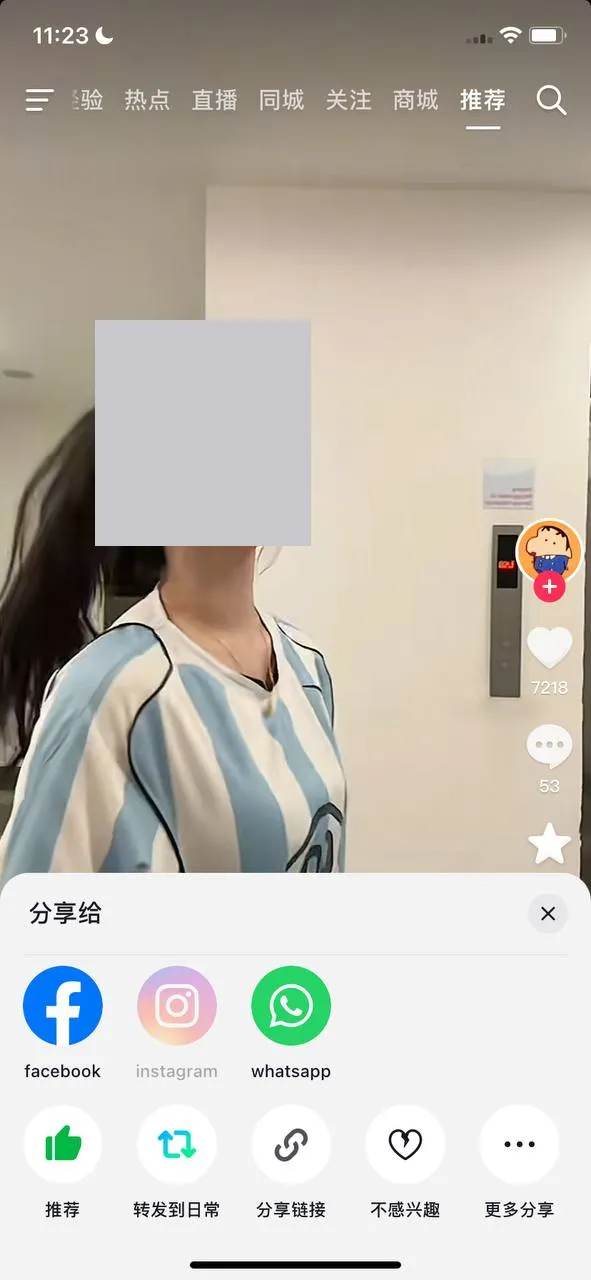
In Douyin, tap the share arrow on the right of the video. In the lower row of round buttons, tap the one with a chain icon.
Paste the whole thing
Douyin copies a short paragraph with a link inside. Paste it into the box above exactly as it is and tap Download.
Choose a version
The result card offers No watermark, and sometimes Original as well. Tap one to save it.
How the Douyin versions compare
In two of the three Douyin videos we checked, the No watermark file was already as tall as the original. In one of those, the No watermark file was 1080x1600 and 2.6 MB, and the original had the same frame but weighed 36 MB.
The third post went the other way. Its original was the taller frame, 1440x2558, yet a smaller file than the No watermark one. It was also HEVC, a codec some older devices and editing apps can’t open, and so was one more of the three originals.
| Type | Quality | Size | Notes |
|---|---|---|---|
| No watermark | 1080x1600 | 2.6 MB | h264 |
| Original | 1080x1600 | 36 MB | h264 |
| No watermark | 720x1280 | 3.7 MB | h264 |
| Original | 1440x2558 | 2.8 MB | hevc · This original is HEVC (H.265), and some older devices can't play it |
| No watermark | 1080x1920 | 2.9 MB | h264 |
| Original | 1080x1920 | 7.5 MB | hevc · This original is HEVC (H.265), and some older devices can't play it |
Measured November 17, 2026 on Windows PC · How we test ›
A short rule of thumb: for sharing in a chat, take No watermark. For editing, read the codec note in the table before you pick the original. If the Original button names another site, that file comes from there, not from TikGo.
Where the file ends up
The file name starts with “TikGo -” and then the post’s caption. On Douyin that caption is usually Chinese, so expect Chinese characters in the name, and search for “TikGo” rather than for the title you remember. If you watch Douyin on a laptop, copy the address from douyin.com and paste it in; the browser then saves the file to its Downloads folder like any other download.
Which Douyin links work
TikGo takes the link to one Douyin post, in any of the forms Douyin hands out:
- The paragraph copied by the chain-icon button, labelled 分享链接. It mixes Chinese text with a short v.douyin.com address. TikGo finds the address on its own, so there is no need to trim anything.
- The address of a video page on douyin.com, with /video/ and a long number in it.
- A douyin.com address with modal_id= in it, which appears when a video plays on top of the feed.
A link to an account page or a search result is not a single post, so TikGo can’t use it. We haven’t tried Douyin photo slideshows on TikGo yet. And if the result says “Douyin downloads are busy at the moment.”, that try is not counted against your day.
No Douyin account needed
You never sign in to Douyin through TikGo. The app or the website is only there to find the post and copy its link; after that, the paragraph you copied is all TikGo needs.
Questions
Do I need a VPN to download from Douyin?
TikGo does not ask for one. For many Douyin videos, your own browser fetches the file, so your network can affect whether it comes through. If a download stops halfway, the guide to failed downloads explains what to try.
Is Douyin the same app as TikTok?
No. Douyin is the mainland China app, and its links point to douyin.com or v.douyin.com rather than tiktok.com. TikGo handles both kinds of link.
Can TikGo translate a Douyin video or add subtitles?
No. TikGo saves the video as Douyin serves it and does not edit the picture or the sound.
Can I search for a Douyin video on TikGo?
No. TikGo has no search. Find the video in the Douyin app or on douyin.com first, then copy its share link.