Download Instagram Reels and videos
Copy the link to a public Reel or Instagram post, paste it below and tap Download.
- Free, no account needed
- Your videos are never stored
- Works on phones and computers
No sign-up, no fee — and we never keep a copy of your video.
Tick the box below to go on
Three steps for a Reel
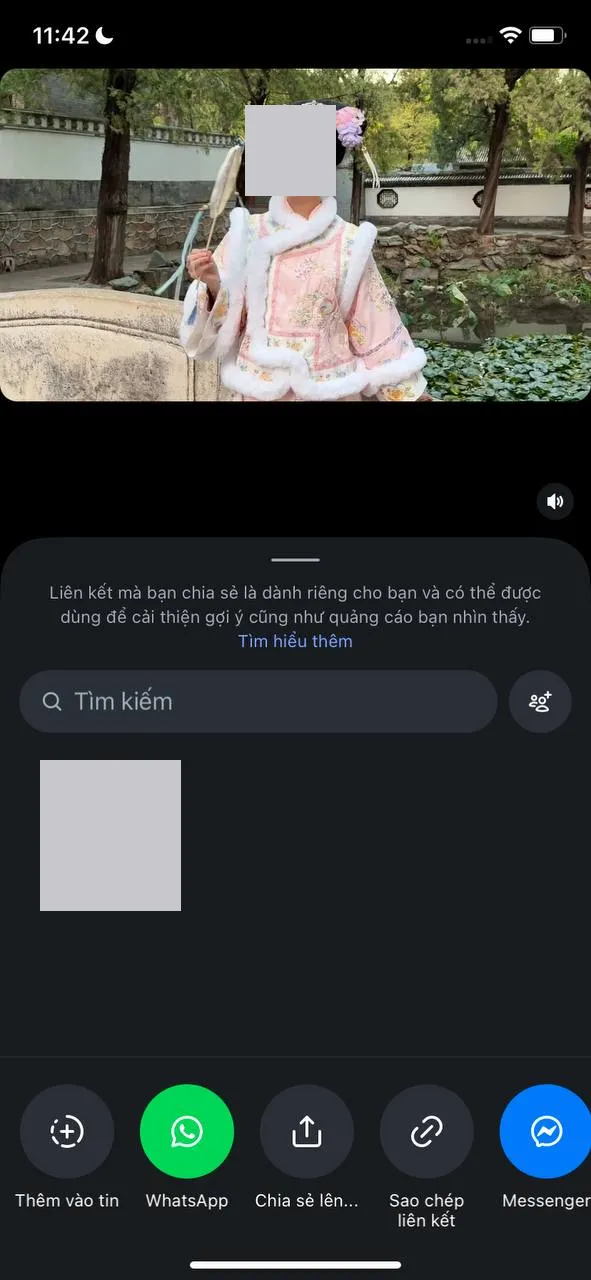
Open the share sheet
Tap the paper plane icon on the Reel or under the post. A panel slides up with your contacts and a row of round buttons.
Copy, then paste here
Tap the chain-link button in the bottom row, come back to TikGo, paste the link into the box above and tap Download.
Tap No watermark
That button saves the Reel to your device. An orange Original button may appear as well; it leads to another website.
What a saved Reel looks like
Reels are tall videos, and the files TikGo gets for them are the same shape. All three Reels we measured came back at 720x1280 in H.264, a format almost every phone and computer plays.
What changed from Reel to Reel was the size, and in these three it followed the length. The shortest one, under 20 seconds, was 3.3 MB; the longest, close to a minute, was 9.9 MB.
| Type | Quality | Size | Notes |
|---|---|---|---|
| No watermark | 720x1280 | 4.5 MB | h264 · The original is not offered on this site |
| No watermark | 720x1280 | 3.3 MB | h264 · The original is not offered on this site |
| No watermark | 720x1280 | 9.9 MB | h264 · The original is not offered on this site |
Measured November 17, 2026 on Windows PC · How we test ›
All three also showed the orange Original button, which takes you to another website for a sharper copy. TikGo itself saves the No watermark version, which is why the table notes that the original is not offered here. Do not count on that button for every post: it only shows up when there is a sharper copy to point to.
Getting the Reel into Photos or Gallery
Like any other browser download, the Reel first lands where your browser keeps downloads. Many Android gallery apps pick up videos from there on their own. On an iPhone it usually waits in the Files app until you save it to Photos yourself, and our guide to saving videos to your phone shows that step with pictures.
On a computer, the file goes to the browser’s Downloads folder.
Links you tap inside Instagram often open in its built-in browser. TikGo warns that saving often fails in browsers like that, and we have not tried TikGo inside Instagram’s yet. If the yellow notice appears, open the page in Safari or Chrome before saving.
Reels, posts and what is out of reach
TikGo works with the link to one Reel or one post that holds a video. Addresses with /reel/ or /p/ both work. On a computer, open the Reel on instagram.com so the address bar shows /reel/ followed by a code, and copy that address. A few things stay out of reach:
- Stories and highlights. They are not single posts, so TikGo tells you the link doesn’t point to a video or photo post.
- Private accounts. Even if you follow the account, TikGo only reaches what anyone without an account can open. It reports that the post is private or no longer exists, and that lookup counts.
- Photos. On Instagram, TikGo works with video only and does not offer the photos in a post.
One of the four Reels we picked for testing got the private-or-deleted message as well, even though it came from a well-known public account.
When Instagram lookups are busy
Instagram has its own daily ceiling on our side, lower than TikTok’s, and only a few Instagram lookups can run at the same moment. When either is reached, TikGo says Instagram downloads are busy and doesn’t count the lookup. Wait a few minutes and tap Download again.
Questions
Does the saved Reel keep its caption?
Not as text on the video. The caption ends up in the file name after 'TikGo -', which helps you tell your saved Reels apart.
Can I repost a Reel I saved?
Only with the creator's permission, and with credit. Saving a copy does not change who owns the video.
Can I download someone's profile picture?
No. A profile link is not a post. TikGo needs the link to a single Reel or video post.
Is there a length limit for Reels?
Not a separate one. There is only the general cap on file size, which a Reel is very unlikely to reach.
Do I need an Instagram account to use this?
No. You only need the link. TikGo never signs in to Instagram, so it can only reach public posts.